HeadRush runs NAM
Yesterday, HeadRush released Firmware 5.1 for its Prime, Core, and Flex Prime units. This update introduces the ability to play Neural Amp Modeler's A2 and A1 architectures.
How it works
Here's how I got my HeadRush Prime running a model of my Fender Deluxe Reverb. I'm running Firmware 5.1.0.
Get a model on the HeadRush
Option 1: From my computer via USB
I have a model of my EVH 5150III on my computer. To get it onto the HeadRush, I connected the computer to the HeadRush via the USB cable, enabled USB transfer by clicking Menu -> USB Transfer, then dragged the .nam file from my computer to the HeadRush:
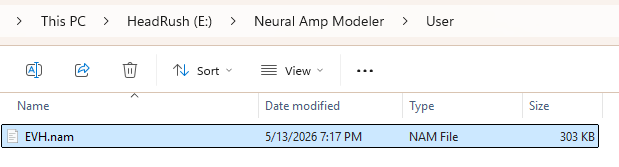
I followed the instruction on the HeadRush's screen--eject the HeadRush on the computer, press "SYNC" on its touchscreen, then disconnect the USB cable--and I'm good to go!
Option 2: Via TONE3000
In addition to that EVH, I've got a model of my Deluxe Reverb on TONE3000 that I want on the HeadRush. This can be done directly from the HeadRush by navigating Menu -> HeadRush Cloud -> TONE3000 in the lower-right corner. From there, you can browse through the models available on TONE3000 and download to the HeadRush what you're looking for.
Put the NAMs into a rig
Now that I have the models I want, I'll create a rig with them.
First, I created a new rig:

Then, I clicked one of the "+" blocks, then selected "Clone" from the Model selector. There's "Neural Amp Modeler" as the second option. I clicked that, then there's "Load NAM" on the right.

The HeadRush starts with two folders for models you got from TONE3000 or uploaded from your own computer:

I see my EVH in the "User" folder (where I put it), and the Deluxe Reverb is in the "Tone 3000" folder. Selecting the Deluxe Reverb, I get a block that's reasonably set up:

Since the Deluxe Reverb includes the full amp / cab signal chain, that's all I need to get playing!
NAM's A2 architecture is slimmable, meaning that one can run these models in "full" mode or a "lite" mode, which saves CPU. I can see that I'm using about 30% of the CPU so far (a blank rig uses about 7%, it seems). If I toggle the "Lite Mode" switch, the A2 runs in Lite mode, which reduces the CPU down to about 24%:

I can create a preset for this NAM block* configuration...

...and toggle between this preset and one for my EVH using the HeadRush's scene functionality:


...and that's it! There's plenty of space to add other effects from HeadRush's collection.
Closing thoughts
NAM started as a "for fun" project for me to experiment with using my (then new) knowledge in deep learning to try and model some of my own amps. I made it open-source because I had seen other people working in machine learning do the same thing, and it felt natural to do the same with my own "pet project." Fast forward 7 and some years, it's deeply rewarding to see this open-source project be able to contribute to products like HeadRush's.

I've been watching musicians who are long-time users of HeadRush's line be thrilled at the sounds they're getting on their pedals from NAM, and I've seen people talk about how they went to the store to buy a new pedal to check it out. It's hard to tell everyone how fulfilling it is to see all of this. Thanks for all of your support; it's really an honor to continue to work on NAM for you.
Enjoy!
Footnotes
*HeadRush refers to the units on the signal chain as "Models". I'll call them "blocks" here to avoid confusion with Neural Amp Models. back
